Many colleagues asked me the same question: how are policy and access control actually implemented?
It is a fair question, because it is very easy to say “the platform has policy” and very hard to explain when it runs, where it runs, and what it blocks. Once we started adopting the platform in real cases, I had to answer that question with more than words. So I started to write down the actual enforcement points.
The mistake we almost made
At first, policy sounded like a document problem. We could have written a few rules, attached them to the capability manifest, and called it done. That would have looked neat, but it would have been fake.
The first real case already showed why. A requirement analysis workflow could read a lot of things, but it should not write back without review. A CI triage workflow could read logs and diffs, but it should not suddenly gain permission to touch unrelated systems. If policy only lived in documentation, every task would end up guessing.
So we changed the approach: policy is not a paper rule. It is a runtime check.
What policy means in the platform
We ended up treating policy as part of the execution path, not part of the UI.
The basic shape became:
- capability or orchestrator starts,
- policy engine checks whether the run is allowed,
- task asks for context or tools,
- policy engine checks every sensitive boundary,
- output is checked again before any write action or external side effect.
That sounds repetitive, but the repetition is the point. The platform should not trust a single upfront check.
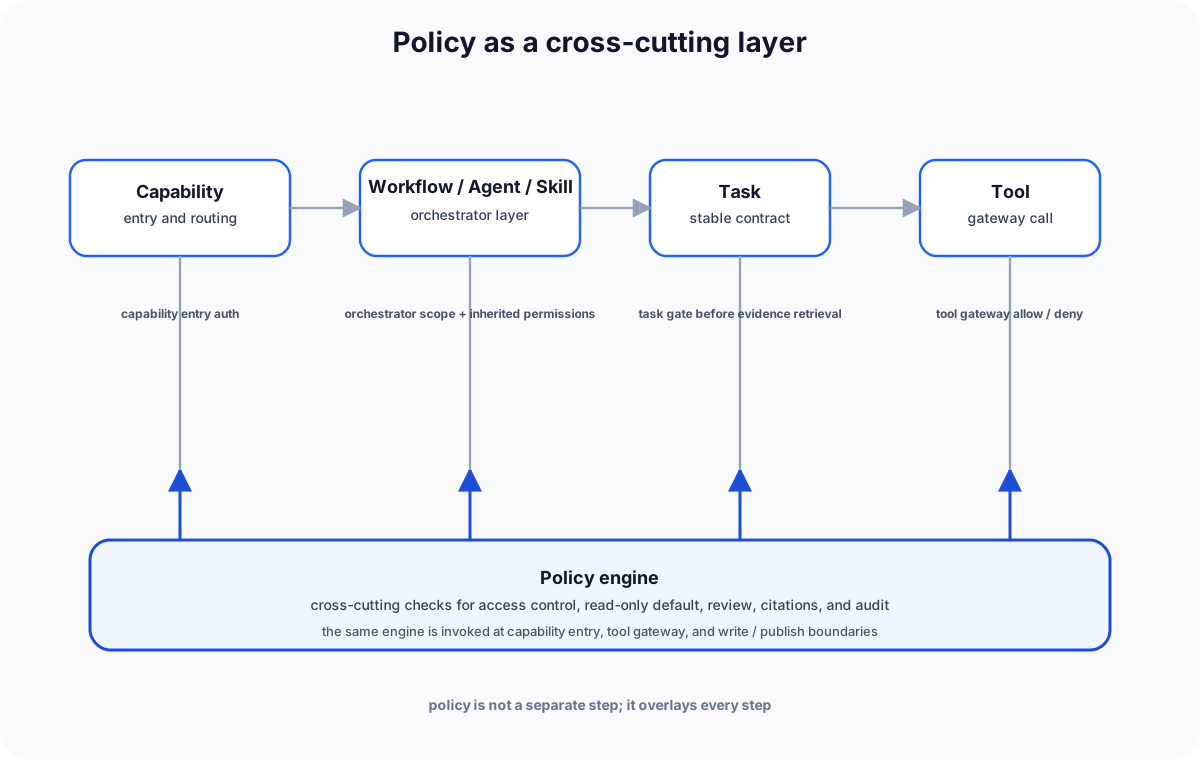
Where the policy engine runs
We used policy in three places.
1. At capability entry
When a user triggers a capability, the platform first checks whether the user is allowed to start it at all.
This is where things like tenant scope, project scope, role, and sensitivity level matter.
1 | |
This check is boring, but it prevents the platform from even starting a run that should never exist.
2. Before each tool call
This was the most important enforcement point.
Tasks do not get to call Jira, Git, CI, or document systems directly. They ask the tool gateway, and the tool gateway asks policy first.
1 | |
That is where access_control_policy actually lives. It does not sit beside the tool; it sits in front of the tool.
3. Before write or publish actions
Read-only work is one thing. Writing back to a system is another.
That is where we used stricter rules like review-required or draft-only. A workflow could generate a draft ticket, but it could not submit it unless the policy engine allowed it.
1 | |
This is also where read_only_by_default_policy becomes real. The default is not “everything is allowed unless blocked”. The default is “nothing writes unless explicitly permitted.”
The policies we actually used
The names varied a little by case, but the behavior was consistent.
access_control_policy
This is the basic gate. It decides whether the user and capability can touch the resource.
It checks things like:
- user role,
- project scope,
- data sensitivity,
- system ownership,
- and whether the requested action is read or write.
read_only_by_default_policy
This is the safety baseline.
If a task or workflow has not been explicitly granted write permission, it should behave as read-only. That made the platform much easier to reason about, especially when we started composing tasks.
source_citation_required_policy
This mattered for evidence-heavy outputs.
If the platform is generating an impact report or triage summary, it should attach provenance or citations. If it cannot cite the source, it should say so.
audit_logging_policy
This policy does not block the action. It makes sure the action leaves a trace.
We needed it because a policy decision without an audit trail is just an opinion.
How the adoption actually happened
We did not turn all of this on in one shot.
The adoption path was more practical:
- start with read-only capabilities,
- put the policy engine in front of the tool gateway,
- make draft output the default for anything that looked like a write,
- add review gates,
- only then consider any controlled publish path.
That sequence mattered. If we had started with write actions, we would have spent all our time debugging permission edge cases.
A small policy engine shape
The platform side ended up looking something like this:
1 | |
And then a task or orchestrator would use it at the boundary:
1 | |
I like this shape because it makes policy visible without making every task carry policy logic inside itself.
What we learned
The biggest lesson was that policy only works if the boundary is concrete.
If you keep policy at the document level, people will ignore it. If you keep policy only at the UI level, tasks will bypass it. If you keep policy only at the capability level, tool calls will leak around it.
So we made policy sit where the risk is:
- capability entry,
- tool gateway,
- and write or publish actions.
That gave us a usable model without turning the platform into a permission maze.
Closing
So when people ask how policy and access control are implemented, my answer is simple:
policy is not a note beside the platform; it is part of the runtime path.
We adopted it step by step, starting from read-only work, then tool gating, then draft and review control, and finally controlled publish. It is not glamorous, but it is the part that keeps the AI platform from becoming a free-for-all.